Personalized Video at Scale: How AI Makes It Possible
Imagine sending a video that speaks directly to your customer, mentioning their name, their company, their exact pain point, to thousands of people at once. A year ago, that would have been impossible.
Today, you can create personalized video at scale with AI.
What personalized video really is
Personalized video is a recording that changes based on who's watching it. Instead of making 100 different videos, you make one. Then AI swaps in the details, names, company names, product recommendations, pricing, call-to-action buttons, to create thousands of unique versions.
Think of it like a mail merge, but for video.
The result is that viewers feel like you made that video just for them. And honestly, in a way, you did. The result? They pay attention, they click, and they move forward in your sales process.
Why personalized video at scale matters right now
We're in 2026, and something has shifted in the world of video. Creating personalized videos at scale used to cost tons of money and take weeks. Now it takes minutes.
Personalized videos have 16 times higher click-to-open rates than generic videos and boost conversions by up to 500%, according to Mediawide's 2026 personalization report. And 85% of marketers say video delivers strong ROI, up from 78% just two years ago, according to Wyzowl.
The companies doing this are winning. The ones still sending generic videos are losing market share.
Three levels of personalization (and when to use each)
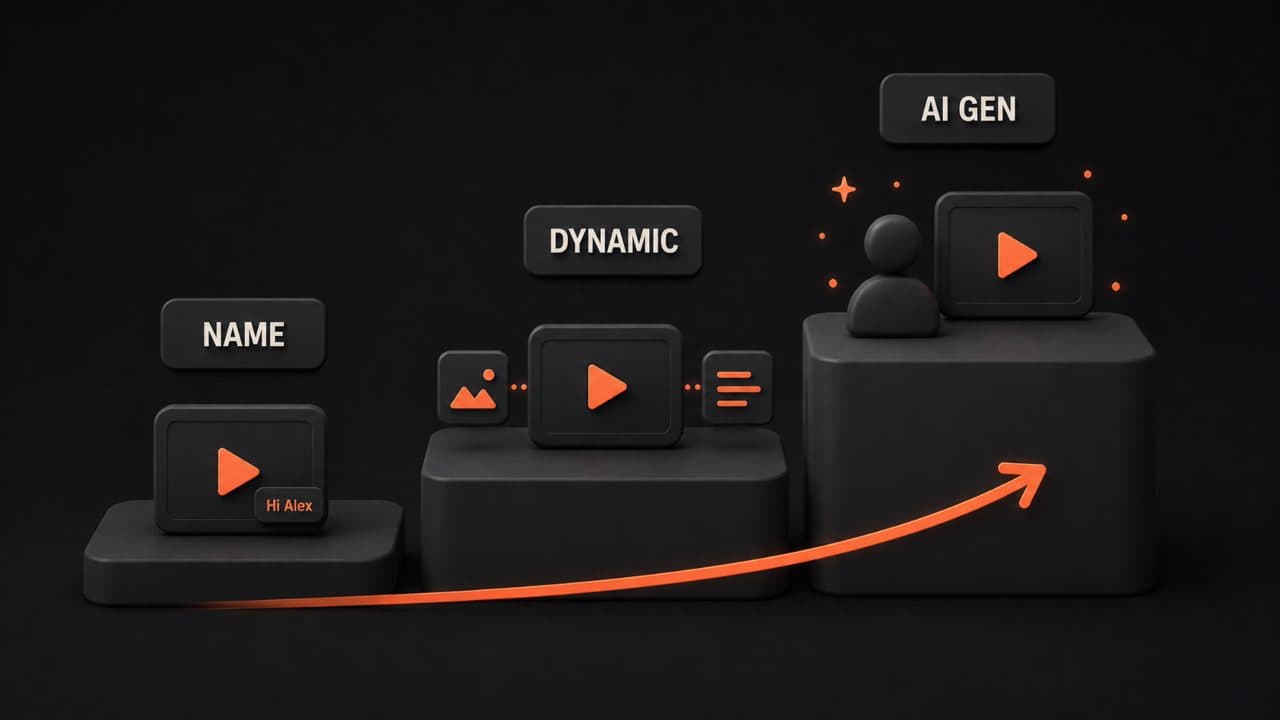
Not all personalized video is the same. There are different levels, and knowing which one to use matters.
Level 1: Name and Basic Data Overlays
This is the simplest approach. You record one video. Then you add text overlays with the viewer's name, company, or title.
It's fast. It's cheap. And it works better than not personalizing at all.
Use this when you're doing high-volume outreach and don't need anything fancy. Sales teams love this for initial prospecting emails.
Level 2: Dynamic Content Swaps
Here's where things get interesting. You record multiple versions of key sections, and AI picks which one to show based on data about the viewer.
Maybe you show your enterprise features to big companies and your SMB features to small businesses. Or you show pricing for California prospects and different pricing for New York.
The same person feels like they're getting a custom experience. But you did most of the work once.
Level 3: Fully AI-Generated Custom Videos
This is the frontier. You don't record yourself at all. You give AI a script, and it generates a video with an AI avatar that has your voice and likeness.
One template becomes thousands of completely unique videos. Different messaging, different examples, different visuals, all generated in seconds.
This takes the most setup, but it scales infinitely.
Tools for personalized video at scale
Several platforms do this well. Here's what you need to know about the major players.
DeepReel
DeepReel lets you record once and personalize at scale. Their pricing is straightforward: $5/month for basic features, $25/month for team collaboration, and $30/month for advanced automation and integrations. You get name overlays, dynamic content swaps, and CRM integration to pull viewer data automatically.
The platform is built for sales and customer success teams who want to move fast without learning complicated software.
Vidyard
Vidyard is built for sales teams and customer success. It handles personalized video campaigns with real-time analytics so you know who watched what. Their strength is their deep CRM integrations, Salesforce, HubSpot, Pipedrive all work natively. If you're already in one of those systems, Vidyard connects directly.
BombBomb
BombBomb focuses on making it stupidly easy to record, personalize, and send. Their interface is clean and simple. No technical skills required. Many real estate and financial services teams use it because it's designed for non-technical users.
Hippo Video
Hippo Video gives you the full stack, recording, personalization, analytics, and automation. They're known for their engagement tracking, showing you not just who watched but where they paused, rewound, or clicked.
Sendspark
Sendspark is a browser extension that makes recording and sending personalized videos from your email client quick. Sales teams report 3x higher engagement and 26% higher reply rates compared to text-only outreach. If you want to stay in Gmail or Outlook, this is simple.
Across all these platforms, the basic story is the same: record once, personalize many, measure results.
Real use cases that work right now
Personalized video isn't theoretical. It's being used every day to move deals, onboard customers, and build relationships.
Sales Outreach
A sales rep records a two-minute pitch mentioning the prospect's company, a recent news story about them, or a specific problem they solve. The video goes in an email. Open rates jump. Reply rates jump. Meetings get booked. For deals that need executive buy-in, a tailored AI pitch video can move stakeholders faster than another cold email.
One sales team using personalized videos reported 4.5x more clicks and 16x more video opens than generic content. That's real money.
Customer Success and Onboarding
New customers are confused. There's always a learning curve. A personalized onboarding video, one that mentions the customer by name and shows features relevant to their use case, helps them get started faster and reduces support tickets. For structured learning paths, AI training videos apply the same personalization approach to employee and customer education.
Personalized onboarding videos increase customer understanding by letting you address specific use cases instead of trying to be everything to everyone.
Retention Campaigns
You know which customers are at risk. Send them a video. A customer success manager recorded a quick message to a segment of customers saying, "Hey, I noticed you haven't used Feature X yet. It's perfect for your situation because of Y. Let me show you how in two minutes."
That message feels personal. It feels like someone cares. And it works.
Event Invitations
Instead of a generic "you're invited to our webinar" email, send a video. The difference in attendance rates is noticeable. People feel more likely to show up when they've been invited to something that feels personal.
How automation workflows multiply your impact
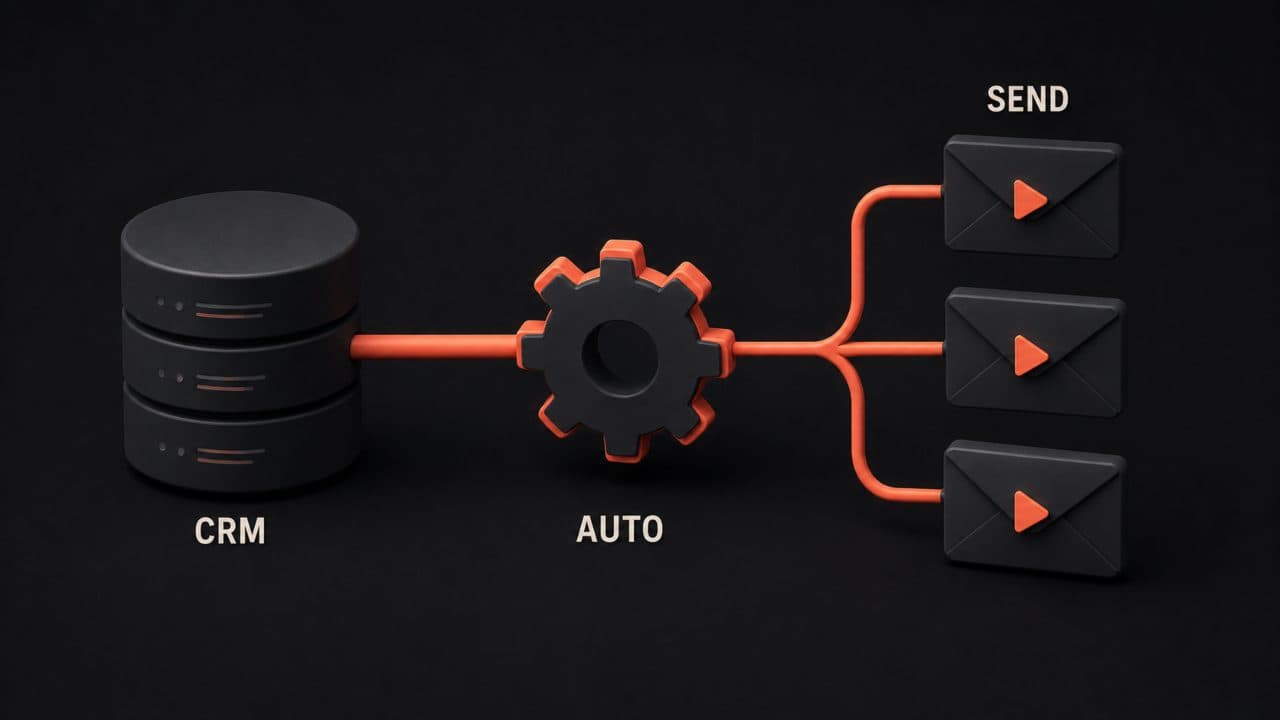
Here's the multiplier effect: once you set up a workflow, personalized videos go out automatically.
CRM-Triggered Workflows
You close a deal in Salesforce. Automatically, an onboarding video goes out with the customer's name and their selected features. You don't lift a finger.
A prospect opens your cold email but doesn't reply. After two days, a follow-up personalized video goes out automatically. Same video concept, different angle.
Lead Scoring and Segmentation
Your CRM has data about each person, company size, industry, behavior, stage. You can use that data to decide which version of your video they see.
Your enterprise package video shows different features than your SMB video. Your logistics company video shows different examples than your retail company video.
AI figures it out and sends the right message to the right person at the right time.
Multi-Video Sequences
Some workflows send multiple personalized videos over time. Day 1: intro video. Day 3: problem-focused video. Day 5: social proof video. Day 7: product demo video.
Each one is personalized. Each one gets better response than a generic sequence. And you set it up once.
Measuring what actually matters
You'll hear a lot about vanity metrics. Don't fall for it.
Watch-Through Rate: How much of the video did they actually watch? If someone watches 80%+, that's interest. If they watch 10%, they're not that interested. Track this.
Click-Through Rate on CTAs: Did they click the button? This is the bridge between "I watched" and "I'm taking action." This matters more than views.
Reply Rate and Response Time: In sales, this is king. Did they reply to your email? How fast? Personalized videos consistently drive higher reply rates than text emails, with improvements of 26% or more according to Sendspark's sales team data.
Deal Velocity: Did it actually move the deal forward? Did the customer onboard faster? Did the prospect become a customer? Track these metrics because they connect to revenue.
Cost Per Outcome: How much did you spend to get that meeting, onboard that customer, or keep that customer from churning? Personalized video usually lowers this number.
Privacy, consent, and doing it right
Here's the uncomfortable truth: using personal data to personalize needs to be done with respect.
Use Data You Already Have: If a prospect is in your CRM, you've got permission to contact them. Using their name in a video doesn't change that. You're not crossing a new line; you're just being more thoughtful about existing communication.
Be Transparent: If someone asks how you're personalizing, tell them. Most people think it's neat, not creepy. The ones who don't want it can always opt out.
Respect Opt-Outs: If someone unsubscribes or asks not to receive personalized videos, honor that. Your CRM should have fields for preference, and your workflow should respect them.
International Rules Matter: GDPR, CCPA, and similar laws have rules about how you use personal data. Know the rules for your region and your customers' regions. When in doubt, ask for explicit consent.
Most companies doing this well use data that customers expect them to have, name, company, email, job title. Not browsing history. Not GPS data. The basic stuff.
Common mistakes to avoid
Mistake 1: Personalizing Too Much
Adding someone's name to a video is great. Mentioning their CEO's recent bankruptcy is creepy. Find the line and stay on the comfortable side of it.
Mistake 2: Low-Quality Production
A shaky, grainy video with bad audio loses the personalization benefit. If your video looks amateurish, people think less of your company, not more.
Invest in decent lighting, good audio equipment, and a quiet space. You don't need an expensive studio. You need to not look like you recorded this in a car.
Mistake 3: Ignoring Bad Data
Your CRM has bad data. Someone's listed as a decision-maker when they're not. A company size is wrong. And your personalized video goes out with incorrect info.
Check your data before you personalize at scale. Run a test batch and look for errors.
Mistake 4: Not Following Up
Personalized video opens doors. But it doesn't guarantee anything. If someone watches your video and doesn't respond, send a follow-up. If they still don't respond, move on.
The personalization helps your first message land. But you still need a sales process after that.
Mistake 5: Forgetting Analytics
You sent hundreds of personalized videos but have no idea which ones worked. You're guessing instead of learning.
Set up tracking from day one. You don't need a complicated system. Just know which videos drove responses and which didn't.
The technology behind personalized video
You don't need to understand how AI works to use it. But knowing the basics helps you pick the right tool.
Data Merging: Your CRM feeds information, names, companies, job titles, custom fields, into video templates. The software swaps these values into the right spots. This is fast. A 10-megabyte video template can generate 5,000 personalized versions in minutes without degrading quality.
Dynamic Content Selection: Based on rules you set (if company size = enterprise, show feature X), the system picks different video segments or text overlays. This happens automatically for each viewer. You could have 20 different product recommendations, and the system shows each prospect the one most relevant to them.
AI-Generated Avatars: Some platforms let you create an avatar, a digital version of yourself. The best AI avatar video generators handle this well. You give it a script, and it generates a full video with your voice and face. This takes more setup but scales infinitely. One company recorded 10 minutes of footage, created an avatar from it, then generated 2,000 unique sales videos in a single day.
Real-Time Tracking: Servers track when videos are viewed, where viewers pause, what they click. This data syncs back to your CRM so you see it in one place. You know not just who watched but how engaged they were, whether they skipped ahead, whether they watched to the end, whether they clicked your call-to-action.
The technology is getting better every year. The technology improves every year. What took custom development in 2023 is now built into most platforms.
Why companies are investing in this now
The math is simple. A sales rep can send maybe 20-30 emails a day if they're writing them individually. Those emails get a 5-10% response rate if they're well-written.
Now the same rep uses personalized video. They send 100+ personalized videos a day. Response rates jump to 26%+ because the video cuts through the noise. That rep is now 3x more productive.
Multiply that by an entire sales team, and you're talking about millions of dollars in additional revenue.
For customer success teams, the math is different but equally compelling. A customer success manager can create one onboarding video that mentions a customer's name and selected features. Send that to 50 new customers. How many of them will get stuck without support? Probably fewer than if you sent a generic guide or nothing at all.
Fewer support tickets. Better onboarding. Higher renewal rates.
For retention and upsell, the logic is the same. You know which customers are at risk or ready to upgrade. A personal message, a video, from someone at your company saying, "I noticed you're using Feature A, and Feature B would save you tons of time", lands differently than an email.
That message lands differently than another generic email.
Getting started: your first campaign
You don't need to overcomplicate this.
Step 1: Pick Your Use Case Sales outreach? Customer onboarding? Retention? Choose one. Trying to do everything at once is how projects die. Pick the place where personalized video will move the needle fastest for your business.
Step 2: Record One Good Video Pick your topic. Set up decent lighting. Record a 60-90 second message. This becomes your template. Keep it natural. Don't over-produce it. People trust authentic more than polished.
Step 3: Add One Level of Personalization Start simple. Add names. Or add dynamic content for different segments. Don't try to do all three levels on day one. Master name overlays first, then move to dynamic content swaps.
Step 4: Send to a Small Test Batch Don't send to 1,000 people on day one. Send to 50. See what works. See what breaks. Pay attention to replies, watch times, and click rates. You'll learn more from 50 good data points than from 1,000 mediocre ones.
Step 5: Measure and Iterate Watch the analytics. Did people watch? Did they click? Did it move the needle on your metric that matters? If response rates are below 10%, something's wrong, bad data, bad video quality, or the wrong audience. Fix it before you scale.
Step 6: Refine the Message Based on what you learned, tweak the script, the visuals, the call-to-action. Maybe the video was too long. Maybe the CTA didn't match your audience's needs. Maybe the opening hook wasn't strong enough. Make one change at a time so you know what actually works.
Step 7: Expand Once you know it works, send to more people. Then add more personalization or more campaigns. Now you can confidently scale because you've proven the concept.
This doesn't have to be complex. Start small, learn fast, scale up. Most teams waste months trying to build the perfect system before they send anything. That's wrong. Send something imperfect today, learn from it, improve tomorrow.
Frequently asked questions
Doesn't personalized video feel fake or intrusive?
No, when done right. If I get an email from someone who mentions my company name and my actual job, I feel like they did their homework. It feels respectful, not creepy.
The key is using data you should already have. Use name and company and job title, information that's public or that you already know. Don't track browsing history or use information they didn't give you. The difference between "Hey Sarah" and "Hey Sarah, I noticed you visited our pricing page six times last week and never came back" is the difference between respectful and creepy. Stay on the respectful side.
How much does it cost to start with personalized video?
It depends on the platform and your volume. DeepReel starts at $5/month. Most platforms charge between $20-100/month for small teams. Some enterprise platforms cost thousands monthly, but you don't need that to get started.
The real question isn't the software cost, it's the cost of the person recording and managing campaigns. If you have someone who spends 5 hours a week on this, that's the real cost. The software is the easy part. Budget for the human time, and the software will pay for itself within your first campaign.
Can I do this if my CRM isn't great?
Yes, but it's harder. The better your data, the better your personalization. If your CRM is a mess, start cleaning it up. Bad data in means bad personalization out, you'll get names misspelled or companies listed wrong, which feels worse than generic outreach.
You don't need a perfect system. You just need accurate names, companies, and key fields. Spend a week getting that right. Then the personalization works. Most platforms can integrate with CSV files if your CRM is limited, so you have options even if your system is basic.
Wrap up
Personalized video at scale is becoming standard. Your prospects expect communication that respects their time and shows you know something about them.
The tools are affordable and the data backs it up. DeepReel makes it simple to record once and personalize for thousands. Pick one use case, send 50 videos, measure the results, and scale from there.