Translate video to English (and 30+ languages) with AI: the complete 2026 guide
Video content dominates how we consume information globally. But if your audience doesn't speak your language, you're leaving money on the table.
AI video translation has removed that barrier. What once cost thousands of dollars and took weeks now takes minutes, and costs a fraction of the price.
In this guide, I'll show you exactly how to translate videos to English and 30+ other languages using AI, including the best tools, pricing, and strategies that actually work.
Why translating video matters for your business
Your video content can reach 8 times more viewers when translated properly.
Think about it: the global population speaks over 7,000 languages. English speakers make up just 15% of the world. That means 85% of potential customers can't access your content.
When you translate videos, you're not just converting words. You're reaching new markets. A marketing video that reaches 1 million English speakers could reach 8 million viewers across multiple languages.
Here's what happens when you translate videos effectively:
- International reach: Access markets in Asia, Latin America, Europe, and Africa
- Higher engagement: Viewers watch longer when content is in their native language
- Better SEO: Translated videos rank in local search results
- Increased conversions: According to CSA Research, 72% of consumers prefer content in their native language
- Brand credibility: Localized content shows you respect your audience
AI makes this possible without hiring expensive translation teams or dubbing studios.
How AI video translation works
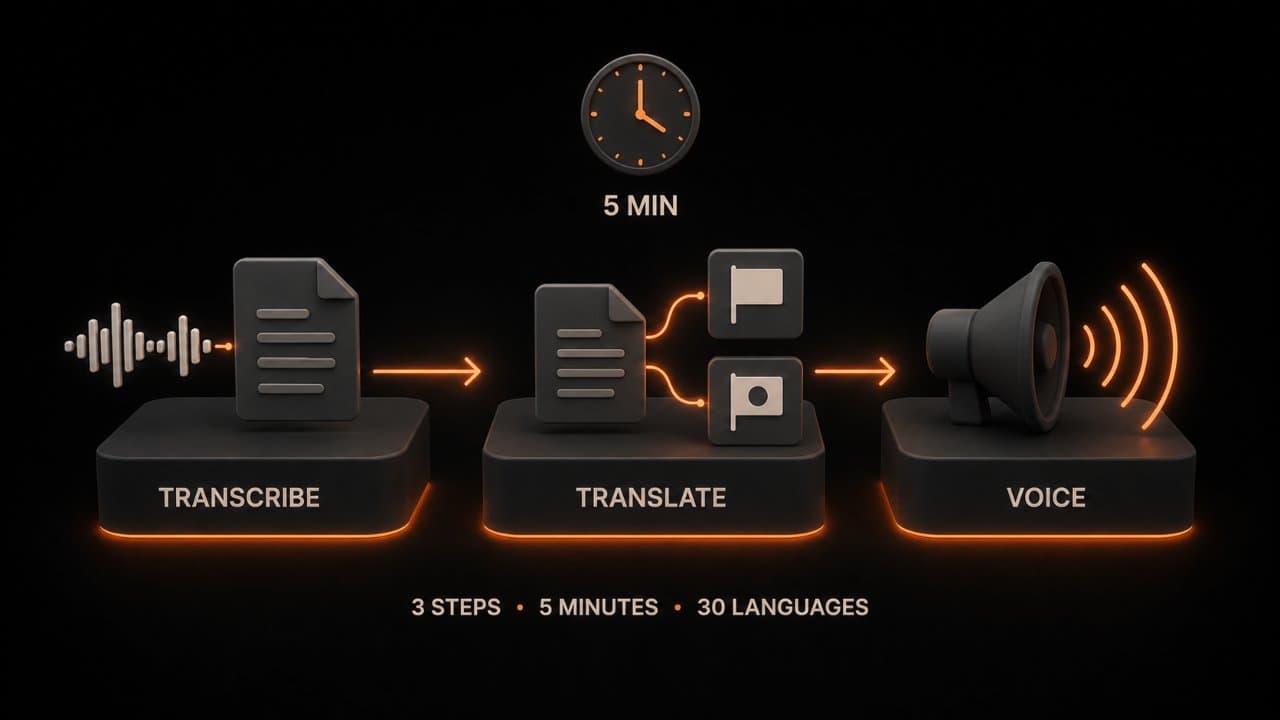
AI video translation isn't magic. It's a three-step process that happens automatically.
Step 1: Speech Recognition (Transcription)
The AI listens to your video and converts spoken words into text. Modern speech recognition engines like Whisper AI can understand accents, background noise, and multiple speakers with 95%+ accuracy.
This transcription is the foundation everything else builds on. Garbage transcription means garbage translation.
Step 2: Translation
Once you have text, neural machine translation (NMT) handles the conversion. Unlike old dictionary-based systems, NMT understands context, idioms, and nuance.
Tools like Google Translate and Claude AI can translate into 100+ languages while keeping meaning intact. The best systems also preserve the tone by keeping marketing copy punchy, technical docs accurate, or comedy funny.
Step 3: Voice Generation & Synchronization
Here's where AI really shines. Instead of hiring voice actors, AI voiceover generates natural-sounding narration in any language.
Some systems add lip-sync technology that matches mouth movements to words, making dubbed videos look realistic instead of awkward.
The entire process takes minutes. A 10-minute video that would cost $2,000 to professionally translate and dub now costs $5-30.
The best AI tools to translate video in 2026
I've tested the major players. Here's how they compare:
DeepReel
Price: $5/month (starter), $25/month (pro), $30/month (growth)
DeepReel is purpose-built for video translation with a laser focus on ease of use.
What works: The interface is intuitive. Upload video, select target languages, hit translate. You get both dubbed and subtitled versions. The AI voices sound natural across languages. Customer support actually responds when you have issues. No minimum commitment.
What to watch: The free tier is limited to 5 minutes. The starter plan only includes one language per month.
Best for: Small creators, YouTube channels, marketing teams just getting started with video translation.
HeyGen
Price: Free tier available, $25-120/month for paid plans
HeyGen excels at video generation but also handles translation well. Their avatar technology is impressive. You can create videos of AI people speaking any language.
What works: Quality dubbing that sounds professional. Quick turnaround. Strong feature set for video creation plus translation.
What to watch: Pricing gets expensive fast if you need multiple videos. Free tier has restrictions.
Best for: Marketing teams and agencies wanting full-featured video creation tools.
Rask AI
Price: $10-60/month
Rask AI specializes in AI dubbing and subtitle generation for content creators and businesses.
What works: High-quality dubbed audio that sounds natural. Supports 130+ language pairs. Strong for YouTube channels. Built-in translator specifically trained on video content.
What to watch: User interface isn't as intuitive as some competitors. Customer support can be slow.
Best for: YouTube creators and online course creators who need fast, affordable dubbing.
Papercup
Price: $99-500+/month
Papercup sits at the premium end of the market.
What works: Professional-quality dubbing with AI voices that sound almost human. Good for broadcast and commercial content. Supports 30+ languages.
What to watch: High price point. Steep learning curve. Requires longer turnaround than competitors.
Best for: Larger companies, broadcast networks, and production studios needing broadcast-quality results.
Dubverse
Price: Free tier, $99+/month for paid
Dubverse offers a middle ground between budget and professional options.
What works: Good voice quality. Supports 16 languages. Free tier lets you try before paying. Collaboration features for teams.
What to watch: Limited language support compared to competitors. Can be slower than some alternatives.
Best for: Small businesses and educational institutions with budget constraints.
Dubbed vs. subtitled videos: which should you choose?
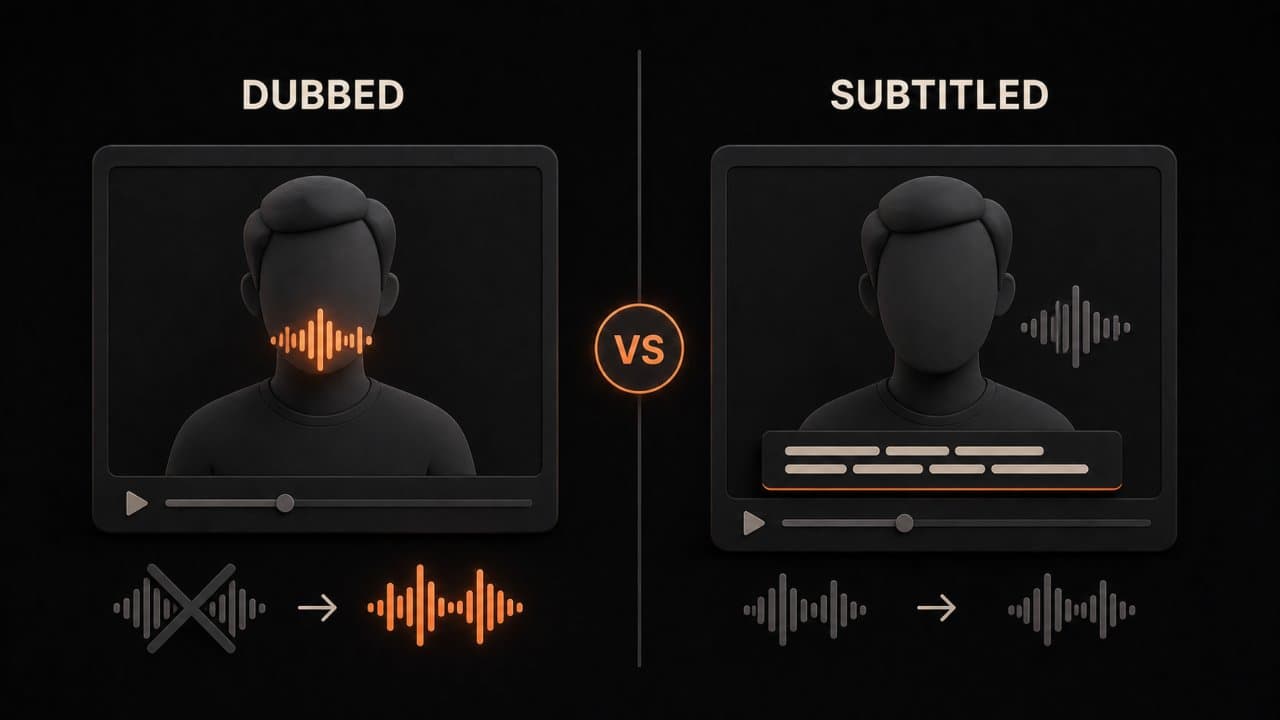
This question comes up constantly. The answer depends on your content and audience.
Dubbed videos (replaced audio):
- Viewers don't need to read
- Better for entertainment and marketing
- Reach viewers with hearing difficulties if you add captions too
- Cost more
- Can feel fake if lip-sync isn't perfect
- Work better for narrative content
Subtitled videos (original audio plus text):
- Viewers maintain creator's original voice
- Cost significantly less
- Work everywhere including sound-off social media
- Viewers can still hear original accent and tone
- Need reading effort
- Better for technical or educational content
The winning strategy: Use both. Upload dubbed versions to YouTube and your website. Use subtitled versions on TikTok, Instagram, and LinkedIn where people watch without sound.
This doubles your reach without doubling your cost. Subtitles add maybe 10% to the price of dubbing.
The lip-sync technology that makes dubbing realistic
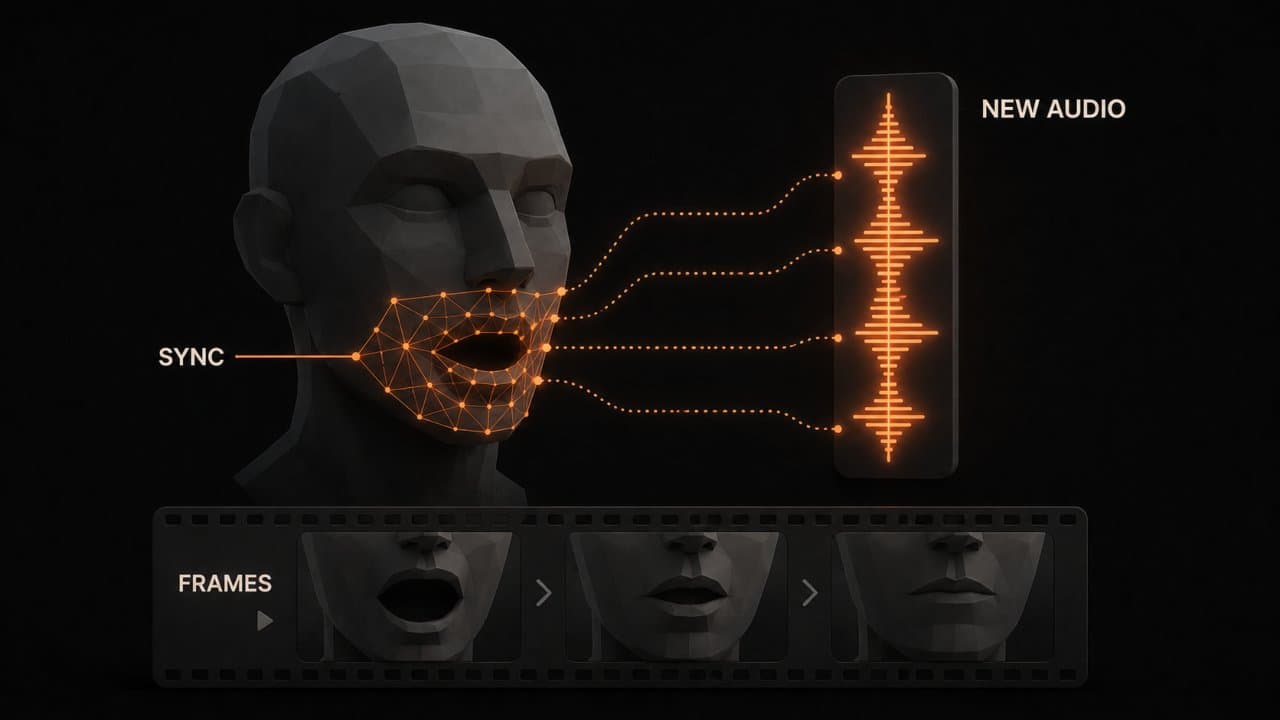
Watching someone's mouth move and hearing different words is deeply uncomfortable. Our brains notice immediately.
Modern AI solves this with visual lip-sync technology. The AI analyzes the original speaker's mouth movements and adjusts the translated video's visuals to match the new audio's timing.
This requires sophisticated technology:
- Facial detection finds where the mouth is
- Visual analysis tracks mouth shape and timing
- Frame adjustment stretches or compresses video frames to sync with new audio
- Blending ensures transitions look natural
The result is dubbed videos that look professional instead of awkward.
Not all AI translation tools include lip-sync. DeepReel and HeyGen do it well. Budget options like Rask AI skip this feature to keep costs down.
Your choice depends on budget and content type. Entertainment and marketing benefit from lip-sync. Training videos and webinars don't need it.
Quality control: making sure your translated video sounds natural
Here's the dirty secret. AI translations sometimes miss cultural nuance, produce awkward phrasing, or make embarrassing mistakes.
A tech company once used an AI translation that rendered "our software is strong" as "our software is strong like ox" in Chinese. Technically accurate but ridiculous.
Quality control checklist before publishing:
1. Review the transcript Read the English transcript the AI generated. If speech recognition got it wrong here, everything downstream will be wrong. This catches 90% of problems early.
2. Check cultural appropriateness Does the humor work in other cultures? Are there idioms that won't translate? One company's "low-hanging fruit" became nonsensical in Russian.
3. Listen to the dubbed audio Play back the final result. Does the AI voice sound natural? Does pacing feel right? Can you understand it clearly?
4. Test on native speakers Show your translated video to someone from the target market. Native speakers catch things AI misses.
5. Proofread subtitles Subtitles often contain typos. Spend 5 minutes fixing them. It's worth it.
Most AI translation tools include editing features so you can fix problems before publishing. This 15-minute quality check is the difference between professional and embarrassing.
Real-world use cases that work
Video translation isn't theoretical. Thousands of companies are using it right now.
Marketing and Sales
A SaaS company translated their product demo into 12 languages. Lead quality from international markets increased 35% in the first month. Cost: $240 total, which is 20 videos at $12 each.
Compare that to hiring translation and video production teams. That easily costs $5,000+.
Online Courses and Education
Language is the biggest barrier to online learning. A course creator translated her bestselling online course into Spanish, Portuguese, and French. Revenue increased 210% within three months.
She kept enrollment low initially to maintain quality, but proof exists that demand exists for translated educational content.
YouTube and Content Creation
Most YouTubers focus on one language. The ones getting 10 million views are translating.
A tech channel translated recent videos into Spanish. Within 60 days, Spanish-speaking viewers made up 22% of new subscribers. New revenue from international AdSense payouts covered the translation costs four times over.
Training and Onboarding
Companies with remote international teams use translated videos for training. HR videos in Spanish, Chinese, and French reduce onboarding time by 30%.
A logistics company translated safety training videos into six languages. Compliance improved and injury rates dropped because employees understood instructions in their native language.
Customer Support
Zendesk published translated customer support videos. Support ticket volume dropped 15% because customers watched videos instead of asking questions. Cost of translation: $500. Cost of reduced support tickets: $50,000+ in saved labor annually.
Common mistakes that kill translation quality
Most people do one of these wrong and don't realize it.
Mistake #1: Translating slang and cultural references
Your English joke about American politics falls flat in Japan. Your Australian slang confuses everyone else.
Solution: Rewrite content-specific phrases for global audiences before translation. Replace idioms with clearer language.
Mistake #2: Ignoring on-screen text
Your video shows a screenshot with English text. Translation tools don't always catch text in images.
Solution: Burn subtitles directly onto videos or add a text layer noting "This text is in English, translations available below."
Mistake #3: Using bad quality source video
Mumbling, background noise, or poor audio destroys speech recognition accuracy.
Solution: Clean up audio first. Use a microphone. Reduce background noise. AI translation quality depends entirely on input quality.
Mistake #4: Selecting the wrong translator tool
A $5-per-video tool isn't designed for professional broadcast. A $500-per-video tool is overkill for YouTube videos.
Solution: Match tool to use case. YouTube creators use Rask AI. Marketing teams use DeepReel. Broadcast producers use Papercup.
Mistake #5: Publishing without human review
This is the biggest one. AI translation works great as a first draft. It's terrible as a final product.
Solution: Have native speakers review and approve before publishing. Budget 30 minutes for quality control.
Cost comparison: AI translation vs. human translators
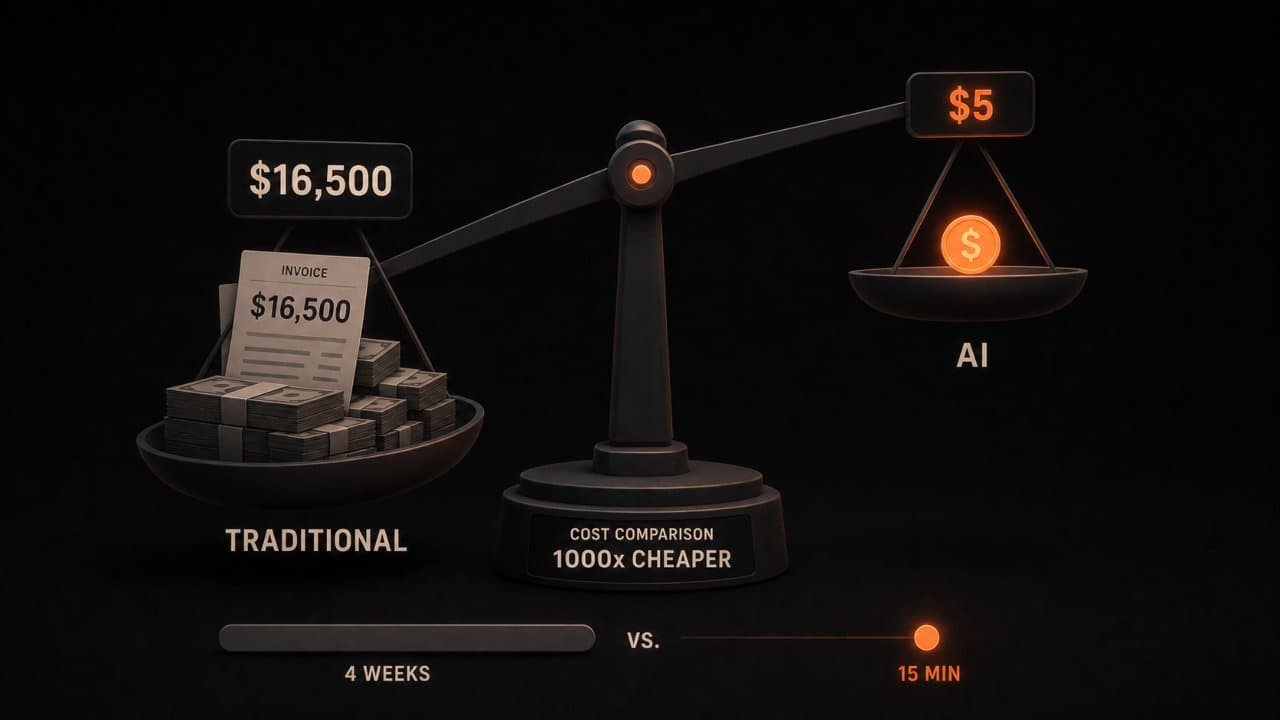
Let's talk numbers. Real numbers.
Professional human translation:
- Per-minute cost: $1-3
- 10-minute video: $10-30 in translation alone
- Voice acting: $500-1,500 per language
- Lip-sync dubbing: $2,000-5,000 per language
- Total for one 10-minute video in three languages: $5,500-16,500
- Timeline: 2-4 weeks
AI translation using DeepReel at $25/month:
- Per-minute cost: $0.03-0.10
- 10-minute video: $0.30-1
- Three languages: $1-3
- Lip-sync dubbing: included
- Total for one 10-minute video in three languages: $3-5
- Timeline: 15 minutes
That's roughly 1,000x cheaper and 100x faster.
The catch: AI quality is 85-95% as good as professional translation. It works great for 90% of content.
When you need human-quality translation: legal documents, medical content, high-stakes marketing to major markets.
When AI is perfect: YouTube videos, training content, social media, webinars, most internal communications.
Smart companies use AI as the default and human translation for critical content.
The future of AI video translation
This technology improves monthly. Here's what's coming:
Real-time translation: Imagine watching a live conference in 30 languages simultaneously. This is already in beta.
Better lip-sync: Deepfake technology is improving. Soon dubbed videos will be indistinguishable from originals.
Context awareness: AI will understand industry jargon, brand voice, and cultural nuance better than it does today.
Automatic quality checking: Tools will flag potential translation problems before publishing.
Emotion preservation: Advanced systems will maintain the emotional tone of original content better than they do now.
FAQ
Will AI translation replace voice actors?
For routine content like educational videos and internal training, AI is already faster and cheaper. Voice acting for entertainment and premium marketing will remain human-driven for now. Some voice actors are learning to direct AI narration and edit translations instead of just recording. Others are cloning their voice to scale their work.
What languages can AI translate to?
Major platforms support 30-130+ languages depending on the tool. Common languages like Spanish, French, German, Chinese, Japanese, and Arabic have the best quality. Niche languages have lower quality but still functional. DeepReel supports 30+ languages with professional-grade quality.
How long does video translation actually take?
A 10-minute video translates in 5-15 minutes depending on the tool and language. Full processing (transcription, translation, dubbing, lip-sync) takes 15-45 minutes. You could translate a monthly batch of videos during lunch break.
Wrap up
AI video translation lets you reach 8 times more viewers at a fraction of traditional costs. DeepReel, Rask AI, HeyGen, and others have made it accessible to creators with budgets of any size.
Pick one tool, translate your best-performing video into 2-3 languages, and measure the results. Start with DeepReel if you want the fastest path from English-only to multilingual.