AI Explainer Video Maker: Professional Videos Without a Production Team
You probably know this already: video sells.
Ninety-eight percent of people watch explainer videos to learn about products. Ninety-six percent say these videos help them make purchase decisions. Those numbers are hard to ignore.
But here's the problem. Traditional explainer videos cost $5,000 to $20,000. You need a scriptwriter, animator, voice actor, and editor. You're looking at weeks of back-and-forth emails.
AI has made that whole model obsolete.
With an AI explainer video maker, you can produce professional videos in minutes. Not weeks. Not days. Minutes. You'll spend anywhere from $5 to $30 per month instead of thousands of dollars. For a full walkthrough of the process from start to finish, our guide on how to make explainer videos with AI covers everything.
I'm going to show you exactly how to use these tools, which ones work best, and how to get measurable results from your videos.
What is an explainer video and why does it matter?
An explainer video is short-form content that teaches your viewer one main idea.
Maybe you're explaining how your SaaS software works. Or why someone should buy your product. Or how to use a feature. These videos typically run 60 to 90 seconds.
Here's why they matter: landing pages with explainer videos convert at 86% higher rates than pages without them. Your average conversion rate jumps from 2.9% to 4.8% when video is present.
Even better, 73% of users have bought a product after watching an explainer video about it.
Let's be honest. That's not small.
The old way vs. the new way
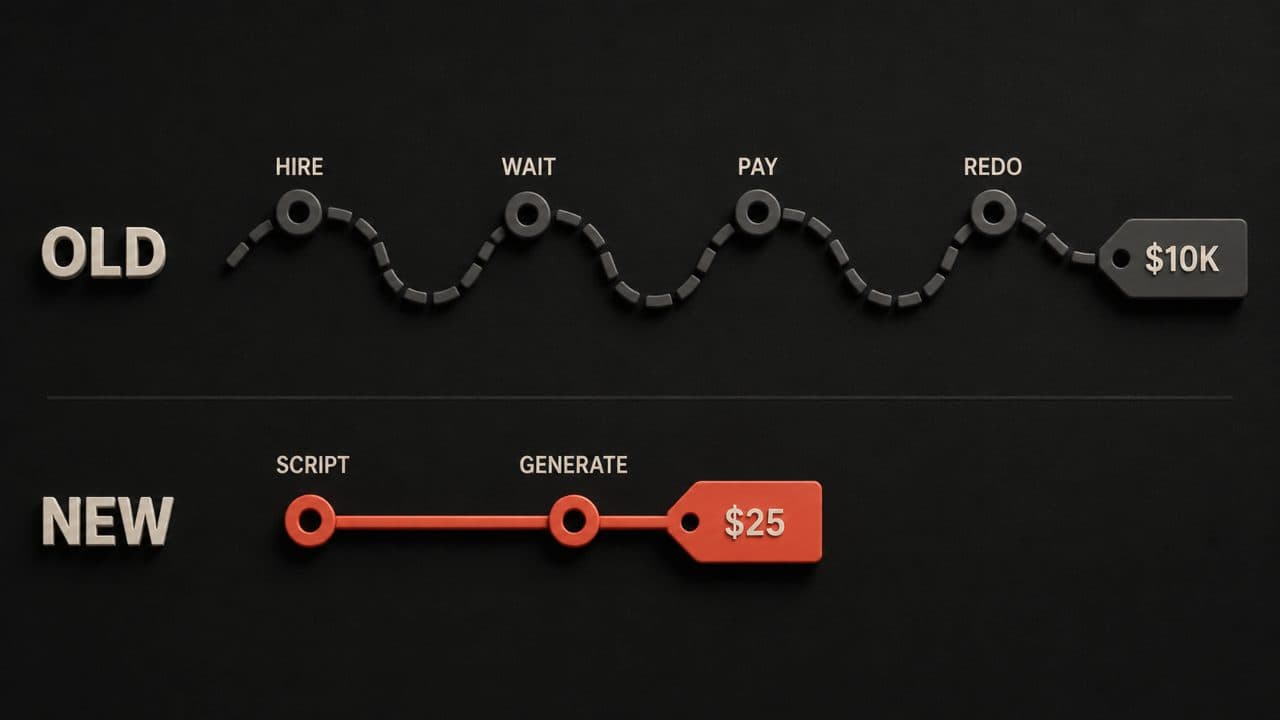
Traditional explainer video production looks like this:
You hire a production company. They charge you $5,000 to $20,000. You wait 4 to 8 weeks. You get maybe 2 or 3 rounds of revisions. If you want to update something? You're paying another fee.
It's expensive, slow, and inflexible.
AI explainer video makers flip this model upside down.
You write a script (or let the AI write it for you). You pick a voice, style, and visuals. You hit "Generate." Your video is ready in minutes.
The cost? Between $5 and $30 per month for unlimited videos. That's literally 1% of what traditional production costs.
Want to test five different versions? Go ahead. Want to update your messaging next week? Done. No meetings. No extra charges.
How much do AI explainer video makers actually cost?
DeepReel pricing is straightforward:
- $5/month: 10 videos
- $25/month: 100 videos
- $30/month: Unlimited videos
Synthesia runs $25/month for 10 videos. Descript is $12/month (or $144/year). Vyond starts at $15/month for basic plans.
Compare that to a single traditional production at $10,000. You could use an AI tool for three years and still spend less.
The math is obvious. But there's more to the story.
With AI tools, you're not locked into one creative decision. You can A/B test scripts. You can test different voice actors. You can try multiple visual styles.
Traditional production? You get what you paid for. One version. One chance.
The best AI explainer video maker tools right now
Let me be clear: there are dozens of AI video tools out there. I'm focusing on the ones specifically designed for explainer videos.
DeepReel
DeepReel specializes in explainer videos and product demos. The interface is built for speed. You paste your script, pick a narrator (they have realistic AI voices), choose your visual style, and generate.
The video quality is professional. Rendering times are fast. You can export and share within minutes.
Synthesia
Synthesia uses AI avatars to deliver your script. If you want a human on screen (even though they're AI-generated), this is your tool. The avatars look realistic. The voices are natural-sounding.
Descript
Descript is more of an editing tool, but it includes video generation features. It's great if you already have footage or images and want to build a video from them. The AI handles transitions, cuts, and effects.
Vyond
Vyond creates animated explainer videos. If you want cartoon characters or animated sequences, this works well. It's been around for years and has a huge library of templates.
Animaker
Animaker is another animation platform. Good for whiteboard-style videos or character-based animations. Pricing is competitive.
Here's my take: DeepReel wins for pure simplicity and speed. Synthesia wins if you want AI avatars. Vyond wins for animation quality. The best choice depends on your style preference and budget.
Step-by-step: how to make an explainer video
Let's walk through the actual process. You'll be surprised how simple this is.
Step 1: define your goal
What are you explaining? Who's your audience?
You're explaining how a SaaS app works to new users. Or you're promoting a new product feature. Or you're teaching something to your customers.
This clarity matters because it shapes your entire script. A script for software users looks different from one targeting prospects.
Spend 5 minutes writing down your goal. Just one sentence.
Step 2: write your script
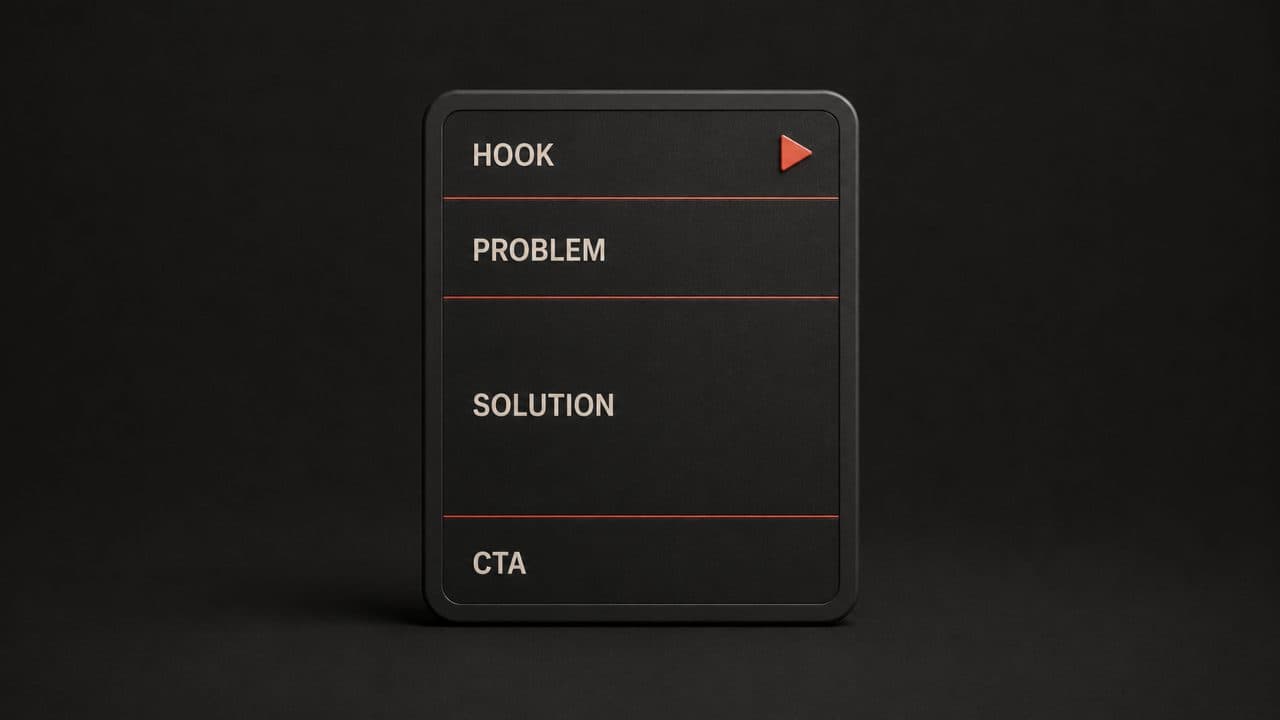
Keep it short. Aim for 60 to 90 seconds of speaking time. If you want a deeper dive on writing scripts that convert, our AI scriptwriting guide covers the full process.
Here's the structure:
Hook (5-10 seconds): Start with a problem your audience faces.
"You're tired of juggling multiple tools to manage your projects."
Problem (10-15 seconds): Explain why this matters.
"Switching between apps wastes time. You lose context. Communication falls apart."
Solution (20-30 seconds): Show how your product solves it.
"Our software brings everything together in one place. Assign tasks. Track progress. Chat with your team. All in one dashboard."
CTA (5-10 seconds): Tell them what to do next.
"Start your free trial today. No credit card required."
Write for ear, not eye. Read it out loud. If it sounds awkward, rewrite it.
Don't use jargon. Fifth-grade vocabulary is your target.
Step 3: choose your style
Do you want animation? A real human speaking? Whiteboard animation?
This is where AI video makers differ. DeepReel offers multiple narrator styles. Vyond focuses on animation. Synthesia uses AI avatars.
Pick based on your brand and budget.
Most explainer videos use one of three styles:
Screen recording: Perfect for software demos. You just record your screen as you click through features.
Animation: Great for explaining abstract concepts. Characters, shapes, and motion catch attention.
AI avatar: Increasingly popular. A realistic human reads your script on camera. We compared the best AI avatar video generators if you want to explore avatar options.
Step 4: generate your video
Upload your script into your chosen tool. Select your voice and style. Hit generate.
Wait 5 to 10 minutes (depending on the tool). Your video is ready.
What used to take weeks now takes minutes.
Step 5: review and tweak
Watch your video. Does the pacing feel right? Does the voice fit your brand?
Most tools let you adjust voice speed, style, and background music. Make these tweaks.
Want a different script? Regenerate. Want a different voice? One click.
Step 6: add a call to action
Don't send your video out without a clear CTA.
Your video should end with a button or link. Click here to download. Click here to sign up. Click here to schedule a demo.
A video without a CTA is marketing that doesn't close.
Step 7: export and share
Export your video as an MP4. Choose your resolution (1080p is standard, 4K if your platform supports it).
Upload to YouTube. Embed on your website. Share on social media. Add to your email campaigns.
The video works everywhere.
Script templates for different industries
Let me give you some frameworks you can copy and paste. You can also use an AI video script generator to create first drafts automatically.
SaaS Software (Project Management Tool)
"Are you drowning in email threads about projects? We built a platform that keeps everything in one place. Assign tasks. Set deadlines. Track progress. Your whole team stays aligned. Start your free trial. No credit card needed."
E-Commerce Product
"Shopping for running shoes shouldn't be complicated. Our shoe finder asks you three questions about your gait and foot type. Then we recommend the perfect pair. Ninety-five percent of customers find their ideal shoe on the first try. Buy now and get free returns."
B2B Service
"Payroll is complicated. You need to manage tax withholdings, benefit deductions, and compliance across multiple states. We handle it all. Our software syncs with your HR system. Taxes are calculated and filed automatically. No errors. No headaches. Schedule a 20-minute demo with our team."
SaaS Course/Education
"Learning to code is hard. Not because programming is hard. But because most courses teach you the wrong way. You stare at videos. You get confused. You quit. We teach differently. Real projects with real feedback. Start your free course today."
Agency/Freelance Service
"Building a website used to require months and six figures. Not anymore. We design and build custom websites in four weeks. You get a fast, beautiful site that converts. And you skip the year-long project timeline. Get a free quote today."
These are starting points. Adapt them to your specific offering.
Why explainer videos work (the data)
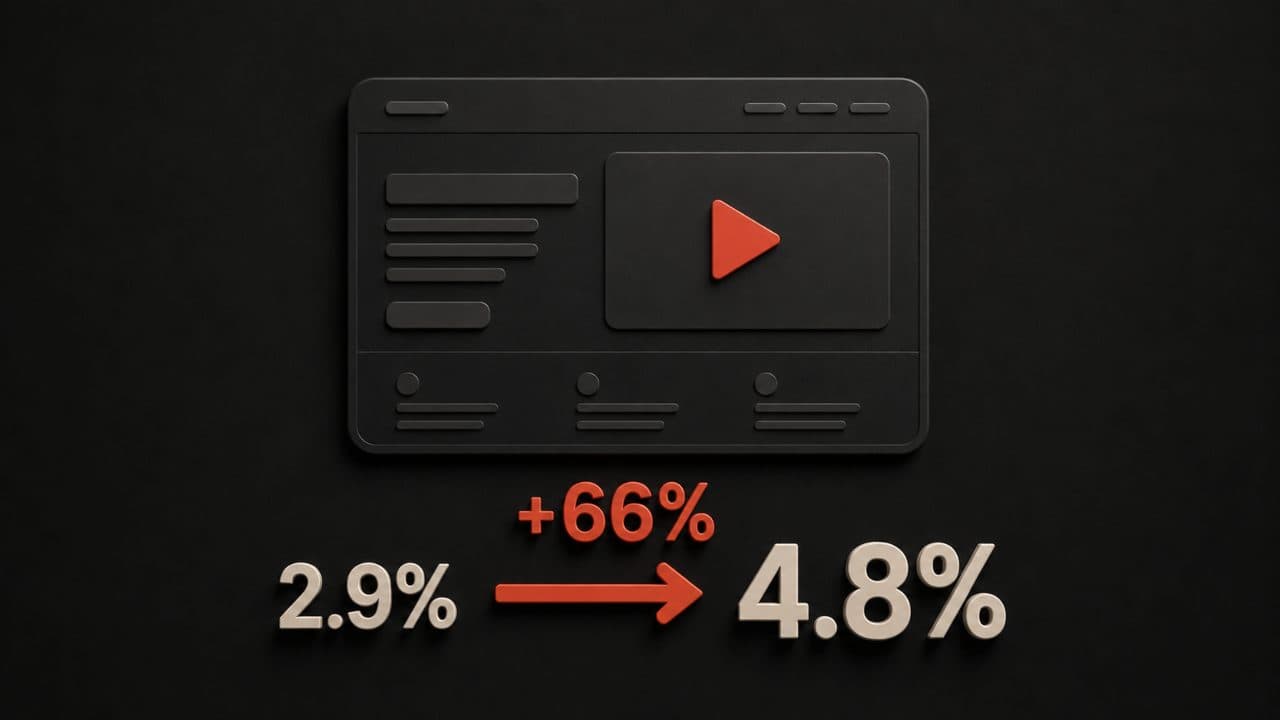
Here's what the numbers tell us:
Conversion impact: Videos increase average conversion rates from 2.9% to 4.8%. That's a 66% improvement. And if your video is truly good? You can hit 10% or higher.
Let me make this concrete. Say you get 10,000 visitors per month. At 2.9% conversion (no video), you get 290 conversions. Add a video? You're at 480 conversions. That's 190 extra sales per month. On a $100 average order value, that's $19,000 in additional revenue. From one video.
Engagement: Ninety-six percent of people watch explainer videos to learn about products or services. That's not a niche. That's mainstream behavior.
Think about your own experience. When you're deciding whether to buy something, do you want to read a product description? Or would you rather watch a 90-second video showing you exactly what you're getting?
Purchase influence: Seventy-three percent of people have bought something after watching an explainer video. This isn't theoretical. People actually convert.
That means seven out of ten people who watch your explainer video make a purchase decision influenced by what they saw.
Product returns: Explainer videos reduce product returns by 35%. Why? Because people have accurate expectations. They know what they're getting before they buy.
Returns hurt your bottom line twice. You lose the initial sale. You pay for return shipping and restocking. Anything that reduces returns by a third is worth the investment.
ROI: Ninety-four point seven percent of marketers report positive ROI from video marketing. And the average video marketing ROI is 6.2x investment.
Translation: for every dollar you spend on video, you get back $6.20.
Compare that to other marketing channels. Email marketing averages 4.2x. PPC averages 2x. Video beats both.
The data supports what you probably already sense: video works.
Distribution: where to put your explainer video
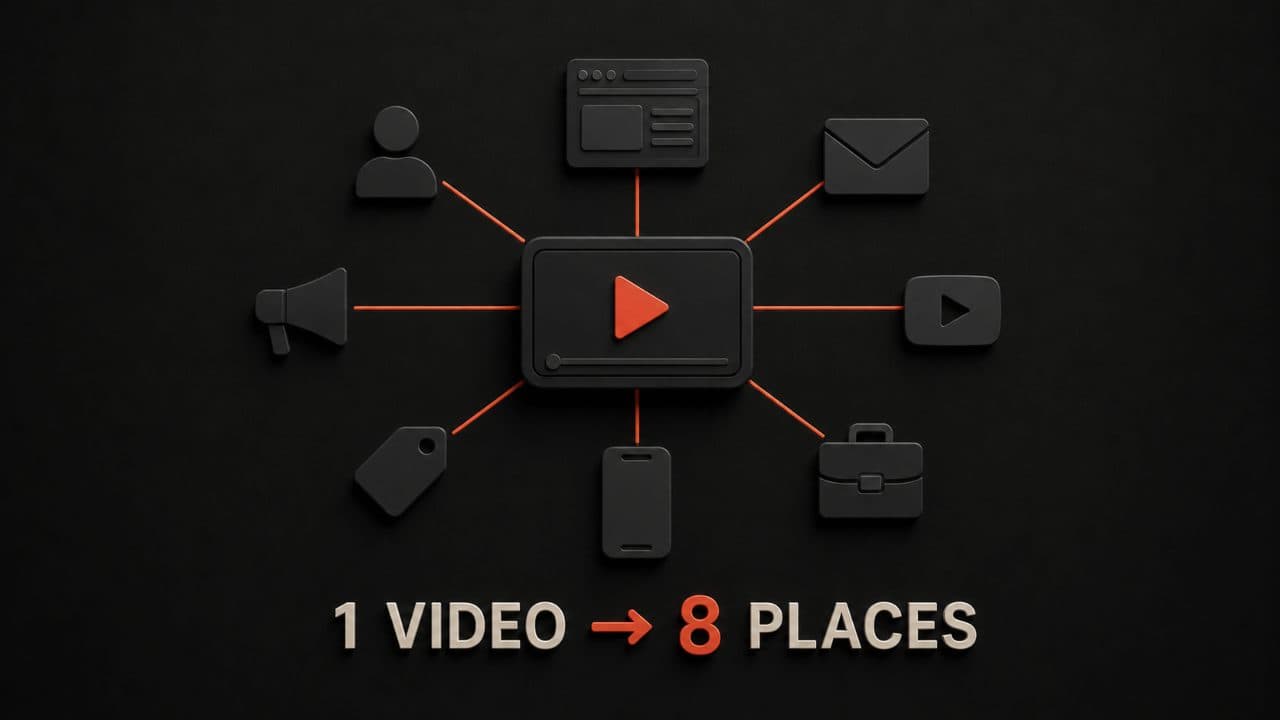
Creating the video is half the battle. Distribution is the other half.
You need a plan for where your video lives and how people find it. A great video nobody sees is a waste of time.
Your website: Embed your video above the fold on your homepage or landing pages. This is prime real estate. People who land on your site should see your video within the first 1.5 seconds of scrolling. Studies show that homepage videos increase time on site by 2+ minutes.
Email campaigns: People click on emails with video more than plain text. Include a video thumbnail and link. Videos in email increase click-through rates by 300%. You don't need a fancy email. Just a compelling thumbnail and a link.
YouTube: Upload your video. Add tags. Write a description with keywords. YouTube gets millions of searches for "how to" content every day. YouTube is the second-largest search engine after Google. If people search "how to [your product]," your video should show up. Our video SEO strategy guide covers how to optimize your videos for search rankings on both YouTube and Google.
LinkedIn: If you're B2B, LinkedIn is gold. Post the video. Write a caption. Engage with comments. LinkedIn videos get 5x more engagement than other content types. B2B buyers watch videos on LinkedIn more than any other social platform.
Sales presentations: Use explainer videos in client calls. It's more engaging than slides. A 2-minute video can replace a 20-minute pitch. Your salespeople will love you. For more on using video in the sales process, our guide on AI sales video covers personalized outreach and closing tactics.
Product pages: Every product page benefits from a video showing the product in action. Conversion rates jump when video is present. If you need dedicated product demo videos, AI tools can generate those too.
Social media ads: Facebook, Instagram, and TikTok all support video ads. Video ads get lower cost-per-click than static images. Your video is an asset you can repurpose across multiple paid channels.
Onboarding: New customers watch onboarding videos. An explainer video helps them succeed faster. When new users succeed faster, they stay longer. Retention improves. For employee onboarding specifically, our guide on creating AI training videos covers that use case in depth.
One video, ten distribution channels. That's use. You create once. You distribute everywhere.
Measuring your video's performance
Don't just assume your video is working. Measure it.
On your website: Use Google Analytics to track time on page, scroll depth, and conversion rate for pages with vs. without video.
In email: Track click-through rates on emails with video thumbnails.
On YouTube: Check watch time, average view duration, and click-throughs from your CTA.
In ads: Track cost-per-view, cost-per-click, and conversion rate.
Direct sales: Ask customers how they found you. "Did you watch our video?" Track this explicitly.
The metric that matters most: does it increase conversion rate?
If your video doesn't improve conversions, something's wrong. Maybe your script doesn't resonate. Maybe your CTA is unclear. Maybe you're targeting the wrong audience.
A/B test different scripts. Try different styles. Measure everything. Optimize based on data.
Common mistakes people make
Let me save you some headaches.
Mistake 1: Your script is too long.
Ninety seconds is the sweet spot. Anything longer and you lose people. I've seen companies create 5-minute "explainer" videos. Those are presentations, not explainers.
Mistake 2: You don't have a clear CTA.
Your video needs to end with something. Download. Sign up. Call us. Buy now. Pick one.
Mistake 3: Your script uses jargon.
Nobody says: "Use our cloud-based infrastructure to optimize your workflow." Nobody talks like that in real life. Write like you're talking to a friend.
Mistake 4: You explain too many things.
Your video should explain one thing. Not three features. Not five benefits. One core idea.
Mistake 5: You forget to update your videos.
Your product changes. Your messaging changes. Your videos should too. An out-of-date explainer video is worse than no video.
Mistake 6: You don't measure results.
You create a video and hope it works. Measure everything. Know your numbers.
AI video makers vs. hiring a production company
Let me give you the honest comparison.
If you're already spending $50K+ per year on video, you might benefit from a hybrid approach. Use AI for quick updates and tests. Use professional production for flagship content.
If you're spending under $20K per year, AI is almost always better. Faster, cheaper, more flexible.
If you're spending nothing right now, AI is absolutely the right move. You'll get 80% of the quality for 1% of the cost. You can always upgrade later.
The truth is this: AI tools are now good enough. They're not perfect. But they're good enough that the cost savings dominate the decision.
You can test AI tools for $5-$10 and see for yourself. That's less than a cup of coffee. If you don't like it, you've lost nothing.
Getting started: your first video
Here's my advice for your first explainer video:
- Pick one product or service you want to explain.
- Write a 60-second script using the templates I gave you above.
- Sign up for a free trial with DeepReel or another AI video tool.
- Generate your video.
- Share it somewhere and measure the response.
That's it. Three days maximum.
You'll have concrete data about whether explainer videos work for you. Then you can decide whether to invest more.
The barrier to entry is essentially zero now. That wasn't true five years ago.
FAQ
How long does it take to create an explainer video with AI?
Writing your script takes 30 minutes to an hour. Generating the video takes 5 to 15 minutes depending on the tool. Review and tweaks take another 10 to 20 minutes. Total time: one to two hours for your first video. After you do it a few times, you'll do it in 30 minutes.
Can I use AI-generated videos for commercial purposes?
Yes. Tools like DeepReel, Synthesia, and Vyond give you full commercial rights to your videos. You own what you create. Always check the terms of service for the specific tool you're using.
What if I hate the first draft? Can I regenerate?
Yes. Change your script, voice, style, or all three. Generate again. Most tools let you regenerate as many times as you want (as long as you're within your monthly limit). A/B testing is built into the process.
Wrap up
An AI explainer video maker lets you produce professional videos in minutes instead of weeks, at a fraction of the cost of traditional production. The conversion data backs it up: landing pages with video convert 66% better than those without.
Write a 60-second script. Generate your first video with DeepReel. Embed it on your homepage. Measure the impact. Plans start at $5/month.